

Trackleaders PING App

The Ping app is available, at no cost, on the Apple App Store and the Google Play Store. To use the app, you must register with Trackleaders for the event you wish to be tracked on. Contact the event organizer for the registration form, for that. (A small fee is usually charged for event registration).
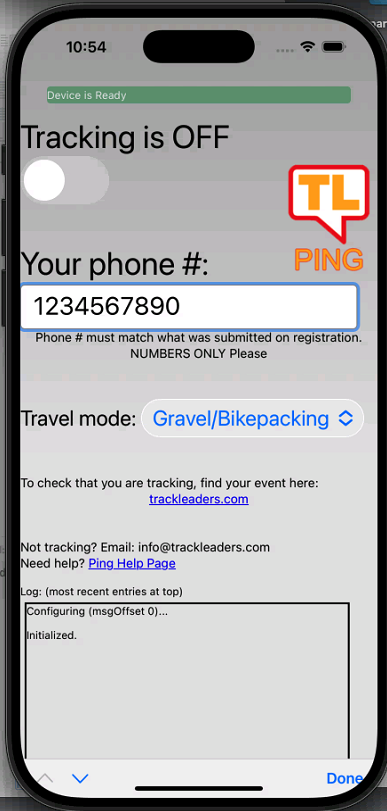 To install: Search for "Trackleaders Ping" in the App Store (iOS) / Play Store (Android). Direct links:
 iPhone: https://apps.apple.com/us/app/trackleaders-ping
Android: https://play.google.com/store/apps/details?id=io.trackleaders.paradox
Instructions: The app is very simple: it is only used for sending your location to our live map. Enter your phone number (numbers only), turn tracking on in the app, give it the necessary permissions and you should show up on the live map for the event you're doing.
- While riding, remember to turn on the tracking function of the app, and leave your phone in data mode (the app will not work in airplane mode).
- The app is designed to be a minimal drain on battery. It has a 48 hour timeout function, so it will kick you out of tracking mode. For this reason, it's best to turn it on just before the start.
- Battery saver mode is not recommended. Just like with Strava or other apps, sometimes it will work, but gaps in coverage or inaccurate GPS become more likely.
- It's a good idea to check that it's still engaged in tracking at some points during the ride (sometimes phones decide to background or shut down apps like Ping after some time).
Not tracking? A few things to check:
Check your phone number
The phone number you enter in the Ping App must match what you entered when registering for the event. Easiest thing is to do numbers only -- no dashes.
Make sure you're registered for the event
Your name should appear in the "participants" sidebar on the tracking map. If it doesn't, you're not registered. Check your registration and email us to have a look.